
Inside Slack’s $4 Billion Growth System
This is how Slack's $4.22 billion ARR and 52 million users growth system works

Slack needs no introduction. It is one of the most widely used communication tools on the market.
When looking at Slack's strategy, one thing stands out:
Slack didn't win just because of a great product. They won because they engineered a viral loop that bypasses the CEO and infects the company from the bottom up.
While most B2B tools try to sell to the C-Suite, Slack weaponized the end-user. They trusted that as more colleagues joined, others would naturally follow.
They were right.
For this breakdown I’m re-touching my article from last year - let’s jump in.
How Slack’s Growth Loop Looks Like
Slack’s team trusted the strength of their product, believing that as more colleagues joined, others would naturally be encouraged to do the same.
They were right.
This approach is how they built a powerful growth loop:

But I started wondering: what does this actually look like? And how does Slack pull people into its loop?
So, let’s answer this.
The Onboarding Process
Everything starts with a user who decides to try Slack.
And this is where Slack’s growth loop begins - on its sign-up screen.

When signing up, Slack suggests using your work email (highlighted in red in the screenshot).
This is because it makes it easier to invite your co-workers later.
And having more of your co-workers means more money for Slack.
But since we’re rebels, I used my personal email - and guess what? Slack pushed the suggestion again.

This time, instead of just making a suggestion, Slack provides a reason. And if I were using it in a work context, this reasoning would make a lot of sense.
So, once we sign up, Slack offers two options:
Option 1: Create a workspace → This is highlighted as the preferred option. Because once you create a workspace, you’re prompted to invite others. This brings more people into the platform = more revenue for Slack.
Option 2: Check if your team is already on Slack → A user-friendly way to hint that you might have used the wrong email address.

💡 This is a good example of how to use multiple call to actions at once. If you want to give your users more than one option, highlight the one that drives your core action. By "core action," I mean the one that ultimately makes you money.
But be careful not to confuse users. The 'Paradox of Choice' kills conversion. Slack offers two paths, but visually prioritizes only one (Create Workspace). This isn't an accident; it's conversion architecture. They guide you to the path of highest value (LTV), while keeping the support path (Find Team) visible but secondary
Once we decide to create a workspace, we’re immediately taken into the onboarding funnel, which is designed to encourage inviting more and more users (which is no surprise) - through both the copy and the mechanics.
This looks like this:
In the first step, you’re asked, “What’s the name of your company or team?”

Next, you’re asked for your name, accompanied by the subheadline: “Help your teammates recognize and connect with you more easily.”

The third step asks you to invite coworkers, with the headline: “Who else is on the [Workspace name] team?”

And while this step isn’t mandatory, you receive a “warning” if you try to skip it.

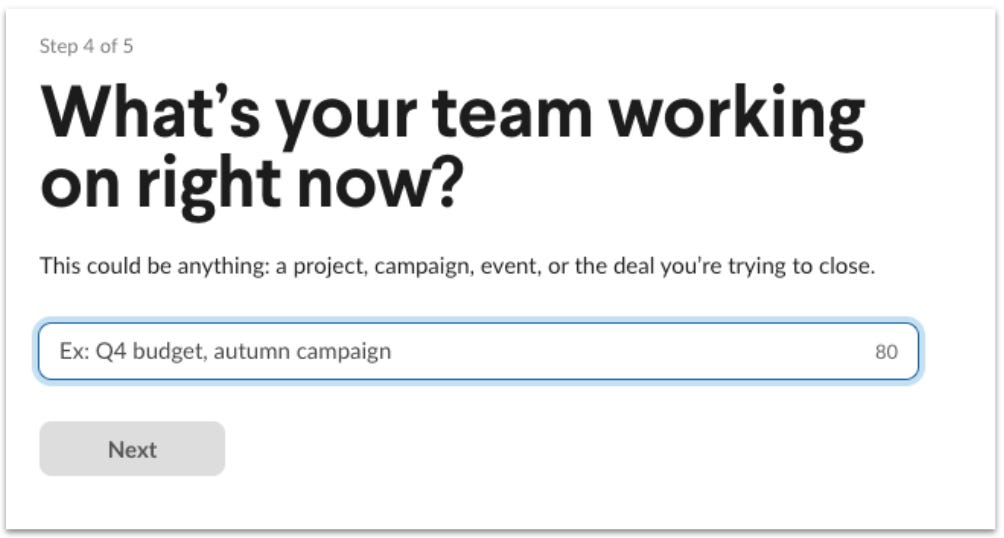
The fourth step asks, “What’s your team working on right now?”
Slack then creates a channel based on what you type in.
And the final step is - of course - upselling.
What caught my eye here is the offer Slack presents right away. This is a smart move because, if you’re already familiar with Slack and want to set it up for your organization, this is the perfect moment to offer a discount.

One thing I want to highlight here is this: go back to the beginning and take a closer look at the copy Slack uses.
Slack doesn’t ask questions about you - even for the question “What’s your name,” there is a subheadline referring to your team. Every piece of text is crafted around the team, the company, and collaboration.
This subtly makes you feel like you’re using a tool that provides value only when you collaborate and work together with others.
Using Slack
Once we’re ready to go, we land on our fully set-up Slack overview.
Now comes the point where Slack employs mechanics designed to encourage you to actively use the tool. Slack’s key activation metric is the number of messages sent per user after sign-up.
💡 The key activation metric is the metric you use to measure when someone reaches the point at which your product creates the most value—also known as the "AHA moment." Which is crucial in determining whether a user uses your tool or not.
And they figured out that users who sent at least 2,000 messages were far more likely to become long-term users.
As Slack’s CEO explains here:
“Based on experience of which companies stuck with us and which didn’t, we decided that any team that has exchanged 2,000 messages in its history has tried Slack - really tried it. For a team of around 50 people, that means about 10 hours’ worth of messages. For a typical team of 10 people, that’s maybe a week’s worth of messages. But it hit us that, regardless of any other factor, after 2,000 messages, 93% of those customers are still using Slack today.”
Slack achieves this key activation metric by guiding users step by step with simple but effective tutorials to ensure they quickly get value out of the tool and use it.

Once we jump into the channel, the tutorials continue by pointing out the next steps, as shown below with “👇 Start here”.

If you follow the steps, Slack continues to encourage you to use the tool.

After sending your first text, you’re rewarded with a success message like this.
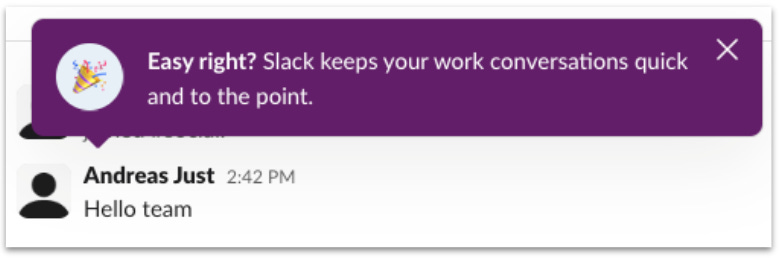
All of this ensures that we not only know how to use the tool but also pave the way playfully for actually working with it.
Once we jump back into our overview after these tutorials, the “+ Invite people” button is highlighted.
This is because Slack wants to further drive engagement.

Invite More and More Coworkers
Hovering over the “+ Invite people” section, Slack offers a helping hand and encourages us to invite more people.

Once we click on the button, we’re taken to a form where we can invite other people with just a few clicks.
And Slack encourages you again to invite as many people as possible, highlighted in the red box: “Get all your coworkers on Slack.”
In addition, you have the option to invite people from your Google Workspace or external organizations. This makes it easy and seamless.

Once we invite someone (for this purpose, I invited myself again 😎), we’re sent to the next screen.
And here comes a smart move by Slack.

With one click on the box in the red-marked area, anyone with the same email domain as the email address used can gain access to this Slack workspace, making it 100 times easier to bring people from the same company on board.
And with that, the growth loop is set in motion, ensuring that more and more people from an increasing number of organizations choose Slack.
How Slack Upsells from Within Its Growth Loop
One last piece of the puzzle is Slack’s upselling strategy.
When we signed up, Slack granted us a 30-day free trial of its “Pro Package.”
This is a good move because, during these 30 days, if we hit the activation milestone of 2,000 messages per user - and assuming we’re part of the 93% that stick with Slack afterward - the upgrade feels like a natural next step.
And I’m pretty sure the 30 days were chosen to correspond to the time an average company needs to reach 2,000 messages + implement it in their organization.
The upgrade packages are designed in such a way that continuing with Slack becomes an easy decision.
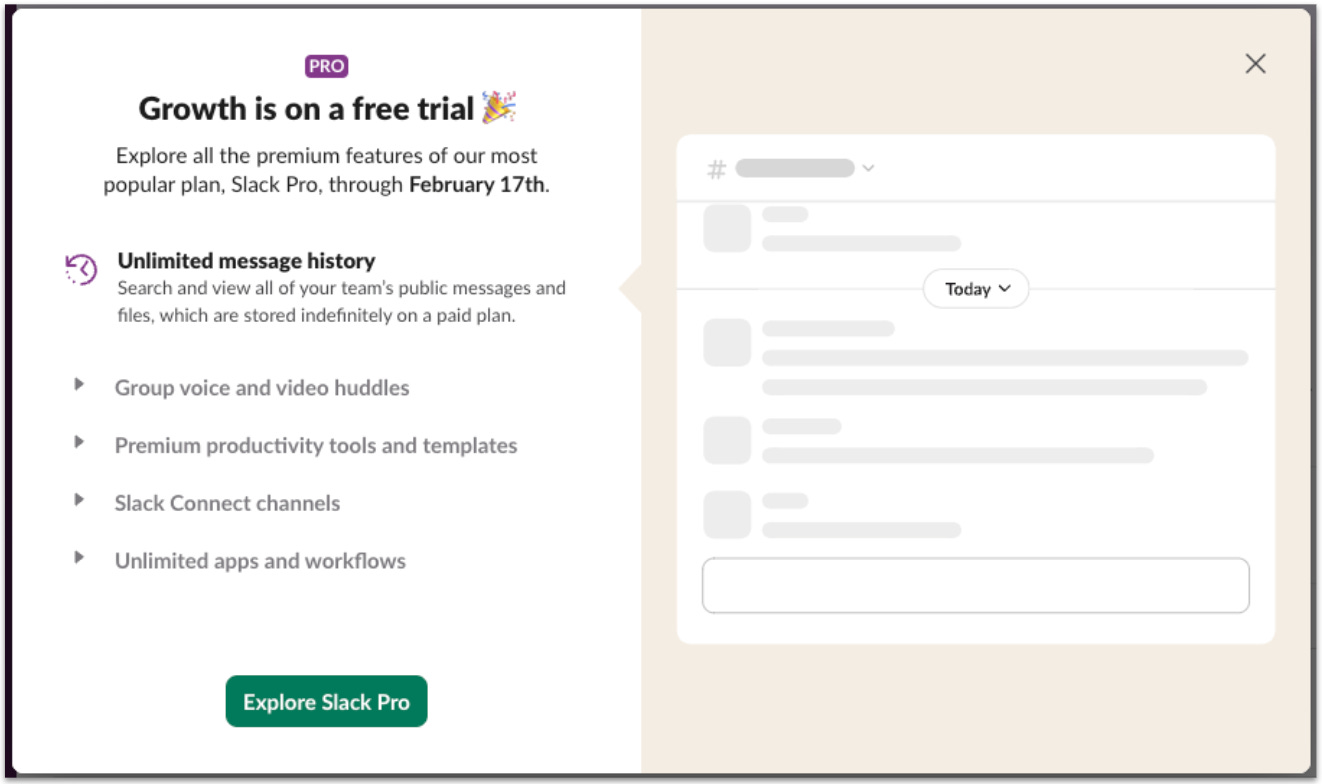
Using Slack in a work context, having “Unlimited message history” is crucial - it means you have access to all messages, all the time. However, in the free version, your message history is limited to just 90 days.
This becomes one of the strongest arguments for upgrading.
The rest of the features are focused on collaboration, which becomes increasingly relevant as your team relies more and more on Slack.
What about those who stick to the free plan?
As of 2025, roughly 73% of all Slack users are on the free tier - that’s an estimated 38 million free users out of 52 million total registered users.
Sounds like a lot, right? And it is a lot… considering the typical SaaS conversion rate hovers around 5%, Slack is doing way better.
And that’s probably because Slack knows a lot about us, and it’s a big lever for upselling.
They know:
Your email address
Your workspace name
What the workspace is for
If you’re using it alone or have invited team members
How many users are in your workspace
How you use it (channels, messages sent, etc.)
And remember, Slack’s activation metric is 2,000 messages sent. Once you hit that, you’re far more likely to become a long-term user.
Based on this, here’s how I would architect Slack’s backend nurturing system with different triggers:
Example 1: User hits 1-500 messages → Action: Email like “5 tips to use Slack in your team” → Goal: Increase usage and invite team members (this naturally drives more usage)
Example 2: User hits 500-1,500 messages → Action: In-app pop-up: “You’re on fire! Don’t lose your history.” → Goal: Upsell pre-framing
Example 3: User hits 2,000 messages → Action: Check if enterprise or smaller company → notify sales (PQL - product qualified lead)
And you can play around with this.
Email drip campaigns. Ad retargeting. Outreach and calls.
It’s always a question of how to push users in the direction where they’re more likely to convert.
Final Thoughts
What Slack does exceptionally well is subtly influence you in every aspect.
The copy and the way the tool is built and structured emphasize three key points:
a) You’re using a collaborative tool → Invite coworkers
b) You have to send messages → Pushing you toward the activation metric
c) You implement it in your organization and take the effort to invite everyone → Pay for the tool
Bottom line: Slack has optimized its growth loop to the maximum. And if you want to set growth on autopilot, take a closer look at Slack.
So, to replicate this success, ask yourself the following questions:
Does your copy align with your goal?
Slack’s goal is to grow within organizations, and its copy reflects this perfectly. It highlights collaboration, teamwork, and value for companies in every text. → How can you tailor your messaging to align with your growth goals?Do you know your activation metric?
Slack’s activation metric is 2,000 messages sent per user. This clear metric enables Slack to build growth mechanics that push users toward this goal. → What is your activation metric, and how can you create features that drive users toward it?Is it worth upgrading to your paid plan?
Slack’s paid plan focuses on features essential for collaboration in a work context, such as unlimited message history. These features are gated without disrupting the core mechanics of the free version. → How can you gate relevant features in a way that makes upgrading a natural decision?
If you enjoyed this breakdown, please tap the like button below. Thank you! 💛
Bottom-up beats top-down when the product sells itself.
Slack trusted the end users to bring everyone else along.